0.022° of resolution.
Every number on this page is a design target for production units. Nothing rounded up, nothing left out, including what it can’t do.
Front halo slot 1.4 mm
Top 150-line knurl
- Part
- Detent One
- No.
- DT1
- Material
- 6061-T6 aluminum
- Mass
- 412 g
- Units
- mm
- Scale
The whole datasheet.
What it is made of, how it feels, what it talks to, and what happens when something breaks.
Body
- Material
- 6061-T6 aluminum, CNC-machined from one billet
- Finish
- Bead-blasted; Type II anodize (Graphite, Glacier, Tally)
- Dimensions
- Ø72 mm base, Ø58 mm knob, 44 mm tall
- Weight
- 412 g. It does not slide.
- Foot
- Replaceable silicone, micro-suction
Haptics
- Motor
- Brushless gimbal motor, field-oriented control at 10 kHz
- Position sensing
- 14-bit magnetic encoder, 0.022° resolution
- Peak torque
- 32 mN·m
- Torque on battery
- 24 mN·m peak, capped to save charge
- Press
- Force-sensing knob, three pressure levels
- Profiles on device
- 64, switched automatically per app
Display & light
- Display
- 1.43″ round AMOLED, 466 × 466, under strengthened glass
- Refresh
- 60 Hz, always-on dim mode
- Halo
- 24-LED light ring in the base, per-profile color
Connectivity & power
- Wired
- USB-C: HID + class-compliant MIDI, no driver needed
- Wireless
- Bluetooth LE 5.3, three pairings
- Latency
- Under 4 ms wired, under 12 ms wireless
- Battery
- 2,000 mAh, about 40 hours of active haptics
- Works with
- macOS 13+, Windows 11, Linux, iPadOS
Software
- Companion app
- Detent Studio for macOS, Windows and Linux
- Account
- None required. Local-first, no cloud, no telemetry by default
- SDK
- Open SDK (TypeScript and Rust); profiles are plain JSON
- Firmware
- Open source (Apache-2.0), signed updates over USB or BLE
In the box
- Detent One
- In your finish, engraved if you asked
- Cable
- 1 m braided USB-C to USB-C
- Paper
- One quick-start card. That’s it.
Care
- Warranty
- 3 years, parts and labor
- Trial
- 60-day studio trial, free return shipping
- Repair
- Four Torx screws. Battery, foot and knob cap sold as parts
Take it apart.
Eight layers under one knob. Pick a view, change the finish, and turn it. Drag, scroll or use the arrow keys.
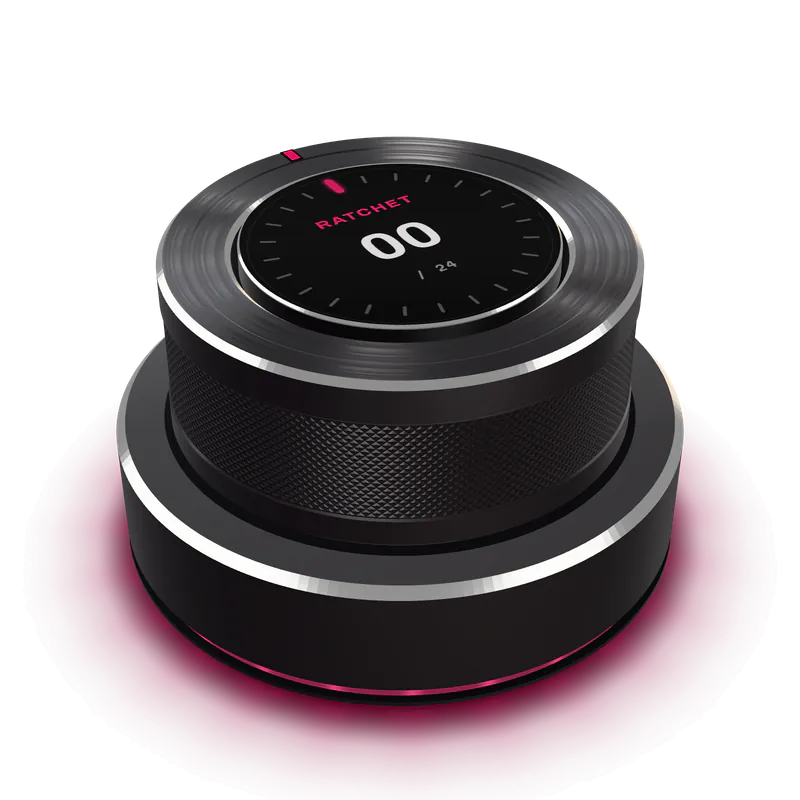
Three-quarter, the way it sits beside your keyboard.
Top to bottom
- Cover glass Strengthened, anti-glare, 0.7 mm. Replaceable with the knob cap.
- Display 1.43″ round AMOLED, 466 × 466. It sits still while the knob turns around it.
- Knob shell 6061-T6, knurled at 150 lines, turned and bead-blasted in one setup.
- Gimbal motor Brushless, hollow shaft. The display cable runs through the middle.
- Encoder A diametric magnet on the shaft over a 14-bit sensor. Nothing touches.
- Main board Motor driver, Bluetooth radio and the 24 LEDs of the halo ring.
- Battery 2,000 mAh, on a connector. Not glued, never glued.
- Base and foot Solid 6061 for weight, four Torx screws, micro-suction silicone foot.
Most knobs are born with their clicks.
A mechanical encoder gets its feel from a notched wheel and a spring, and feels the same in every app for its whole life. Detent’s feel is a torque curve the firmware draws, and redraws when you switch apps. Here are both on the same axes. Pick a profile and turn.
Ratchet. Twenty-four crisp clicks per turn, like a good camera dial.
| Aspect | Mechanical encoder | Detent One |
|---|---|---|
| Where the clicks come from | A notched wheel and a spring, cut at the factory | A brushless motor, redrawn by firmware 10,000 times a second |
| Detents per turn | Fixed. Usually 20 or 24 | Any number from 0 to 360, per app, per control |
| End stops | None, or a metal pin that is always there | Virtual, at any angle, or none at all |
| Return to center | A separate spring-loaded part | A setting. That is the Spring profile |
| Snapping to content | Not possible | Magnet snaps to markers, keyframes and diff hunks |
| Changing the feel | Buy a different knob | About a millisecond, when you switch apps |
| Positions per turn | As many as it has clicks | 16,384, from a 14-bit sensor |
| Wear | Metal contacts. The clicks soften over the years | Contactless sensing. Only two ball bearings touch |
Works with what you already have.
Plug it in and it is a scroll wheel, a volume knob and a MIDI controller, no driver needed. Detent Studio adds the per-app feel.
| Feature | macOS 13+ | Windows 11 | Linux | iPadOS |
|---|---|---|---|---|
| Scroll, zoom, undo, volume, brightness and media over USB-C | Yes | Yes | Yes | Yes |
| Class-compliant MIDI | Yes | Yes | Yes ALSA | Yes |
| Bluetooth LE, three pairings | Yes | Yes | Yes BlueZ 5.66+ | Yes |
| Detent Studio app | Yes | Yes | Yes AppImage, .deb, Flatpak | No |
| Automatic per-app profiles | Yes | Yes | Partly X11, GNOME and KDE on Wayland | Partly Pick on the knob: press and turn |
| Firmware updates | Yes | Yes | Yes | Partly From a Mac or PC |
What it can’t do (yet).
Better you read it here than find out on day three.
-
It can’t switch profiles by itself on an iPad.
iPadOS does not tell other apps which app is in front. On iPad you choose the profile on the knob: press and turn.
Waiting on Apple
-
It can’t tell browser tabs apart.
To Detent, your browser is one app. Figma in a tab gets its profile through the Figma plugin; other web apps get the system set: scroll, zoom, undo, volume, brightness and media.
Planned: browser extension, Studio 1.3
-
It can’t give full torque on battery.
Wireless, peak torque is capped at 24 mN·m so a charge lasts about 40 hours. Plug in and you get the full 32.
By design
-
It can’t work as a linked pair.
Two Detents on one desk are two separate devices today. Linked pairs, one scrubbing and one zooming, arrive in firmware 1.2.
Planned: firmware 1.2, spring 2027
-
It can’t replace your shortcuts.
One knob and one press with three pressure levels. It is not a macro pad and does not pretend to be.
By design
-
It can’t be felt through this website.
A screen cannot push back on your finger. What you hear and see here is a simulation of the torque, not the torque.
Physics
Numbers only go so far.
Six feels, one knob. Turn each of them before you decide.
One email when the list opens 10.20. Nothing else.
Free. Every friend who confirms earns you a reward.
Fully refundable. Locks the $299 launch price.
$299 until 12.04. Free shipping.
$349. Free shipping, 60-day studio trial.